


To troubleshoot battery inverter communication, first confirm that the battery and inverter are an approved pairing. Then check the battery management system (BMS) status, communication ports, cable specification, protocol configuration, and firmware compatibility. Verify recovery with live battery data and a controlled operating test. A displayed battery voltage or state of charge alone does not prove that communication is working.
For commercial installations, a structured diagnosis helps distinguish an interface problem from a battery protection event, a control setting, or a fault inside a battery rack.
What information should the battery and inverter exchange
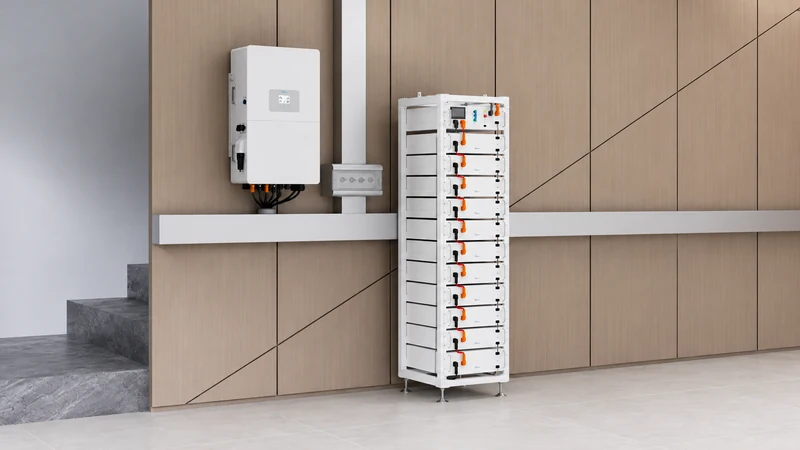
The BMS monitors battery conditions and communicates operating limits. Depending on the equipment, the inverter may receive state of charge (SOC), voltage, temperature, permitted charging and discharging current, and alarms. The inverter uses this information alongside its own settings and site controls.
Many systems use Controller Area Network (CAN) or RS485 interfaces. Matching the interface name is only one requirement: the devices also need compatible message protocols and supported firmware. An RJ45 connector does not establish that a port is Ethernet or that an ordinary network cable has the correct wiring.
Start with the model-specific manuals and compatibility documents available through the Deye ESS Download Center.
Start with evidence before changing settings
Record both model numbers, serial numbers, firmware versions, the exact alarm text, and when the fault began. Note whether it followed commissioning, a battery expansion, a cable replacement, or an update.
Capture local inverter and battery screens at the same time. A cloud dashboard may update more slowly than local equipment, so a delayed online value needs separate investigation.
| Observation | First area to investigate |
| Battery voltage appears, but live BMS fields are missing | Compatibility, communication port, cable, and protocol |
| BMS data is live, but permitted charging current is zero | Battery temperature, SOC, alarms, and protection limits |
| Communication drops during operation | Connectors, cable routing, shielding, auxiliary power, and event logs |
| Fault starts after adding modules or racks | Supported topology, configured module count, addressing, and termination |
| Local data is current, but cloud data is stale | Monitoring gateway and network connection |
These observations guide diagnosis; they are not model-specific fault-code definitions.
Follow a controlled diagnostic sequence
1. Confirm the exact equipment pairing
Check battery voltage class, supported inverter model, regional equipment version, and required firmware. Similar model names do not establish compatibility. For a multi-rack installation, confirm that the proposed controller and rack arrangement are supported as a complete system.
2. Read the battery status and alarms
Confirm that the BMS is powered and has completed its documented startup process. Check for internal communication, insulation, temperature, pre-charge, or contactor alarms. A battery that reports a protective restriction may be communicating correctly while declining a charge or discharge request.
If there is visible damage, abnormal heat, smoke, or an electrical protection alarm, stop routine troubleshooting and follow the site’s emergency or service procedure. Cable inspection and reconnection require the manufacturer’s shutdown and isolation process and qualified personnel.
3. Check ports and the approved cable
Trace the connection from the designated inverter battery-communication port to the designated battery or master-controller port. Do not confuse inverter communication with inter-battery links, service ports, or monitoring ports.
Have the installer compare the cable part number and pin assignment against both manuals. Inspect connectors and cable damage after safe isolation. Substitute a known-good approved cable where appropriate. Do not guess pinouts or assume a straight-through Ethernet cable is suitable.
4. Verify configuration and topology
Compare the selected battery type and protocol with the approved setup instructions. Check baud rate, device addresses, master configuration, module count, and termination only where the equipment documentation requires them. Do not apply another battery family’s switch positions or resistor arrangement.
Change one item at a time and retain the original configuration. This makes it possible to identify the cause and reverse an ineffective change.
5. Review firmware and restart instructions
If the fault followed an update, provide both device versions to technical support. Install only a supplier-approved firmware combination. Use the documented shutdown, restart, and waiting sequence; repeated power cycling without diagnosis can obscure the original fault.
How do you confirm communication has recovered
Confirm that local BMS values update plausibly and correspond with the battery’s own display. Review SOC, temperatures, permitted current, alarms, and detected modules or racks where available.
With installer authorization, perform a controlled charge and discharge test within the approved operating limits. Check that the inverter respects BMS limits and that communication remains stable. Document the result, settings, firmware, and any replaced component.
If the problem persists, send the evidence package to the Deye ESS Service Center. Include timestamped logs, a system diagram, cable identification, screenshots, and the steps already completed.
Plan compatibility before procurement
For a new or expanded installation, contact Deye ESS with inverter and battery models, rack quantity, operating voltage, application, location, and commissioning timeline. Request confirmation of the supported pairing, communication accessories, documentation, and firmware requirements before ordering.
Frequently asked questions
Does an SOC reading prove that battery communication is healthy
No. An SOC value may be estimated, cached, or delayed. Verify current BMS parameters, permitted charging and discharging limits, and alarm status using the equipment’s diagnostic screens.
Are CAN and RS485 interchangeable
No. They are different communication interfaces. Both devices must support the selected interface and the same application protocol, with the correct cable and settings.
Can I bypass communication to restore operation
Do not disable BMS protections or select an unsupported battery mode as a workaround. Any alternative operating mode requires explicit manufacturer approval for the exact battery and inverter combination.
Why can a battery communicate but refuse to charge
The BMS may limit charging because of SOC, cell conditions, temperature, or an active protection event. Inverter schedules and site controls can also prevent charging. Check the reported limits and event history before replacing communication components.